NimbleAF Presents
The Solopreneur's Dashboard for the AI-powered creator with too many tabs open.
Your AI tools, page links, post notes, quick tasks, content dates, and site messages finally get one home inside WordPress. No scavenger hunt required.
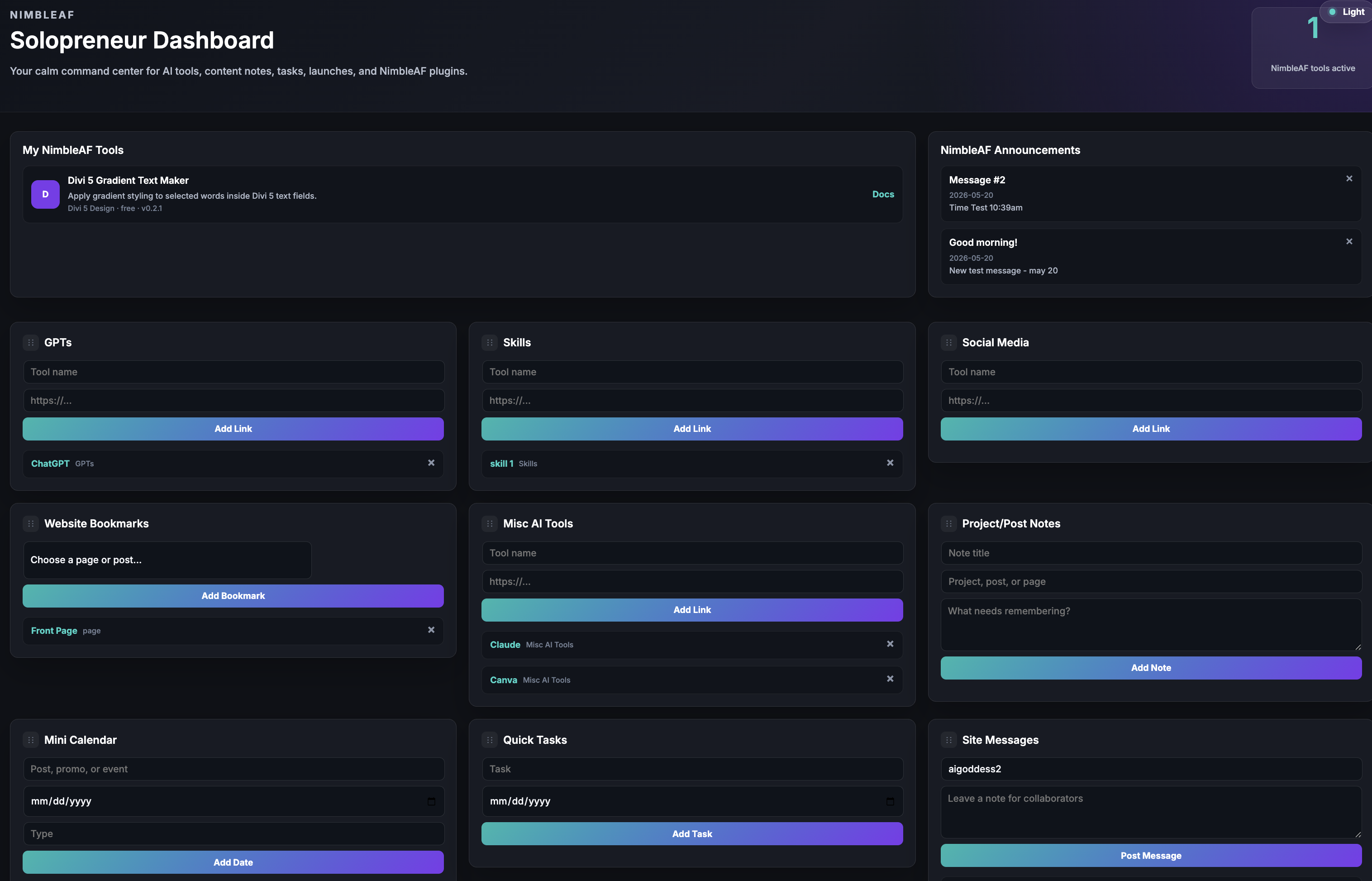
Your WordPress admin just got a lot more useful.
Most solopreneurs do not need another giant productivity system. You need a simple place to park the stuff you use while building your site: AI tools, page links, post notes, quick tasks, content dates, and the messages that keep projects moving.
Stop Reopening The Same Tabs
Save the AI tools, GPTs, social tools, and resources you reach for constantly.
Catch The Notes Before They Wander
Drop post ideas, launch notes, client feedback, and edit reminders right where the work is happening.
Handle The Tiny But Important Stuff
Track follow-ups, content dates, launch reminders, and the little things that are easy to forget.
What You Can Finally Stop Chasing Around
AI Tool Quick Links
Sort GPTs, skills, social tools, and random-but-useful AI links into clean boxes.
Website Bookmarks
Jump straight to the pages and posts you keep opening again and again.
Project/Post Notes
Keep content notes, client notes, launch reminders, and fix-this-later thoughts close.
Quick Tasks
Add reminders without turning your day into a project management ceremony.
Mini Calendar
Keep posts, promos, launches, and reminders visible without overcomplicating it.
Site Messages
Leave quick messages for yourself or anyone else working inside the site.
Drag it around until it makes sense.
Your workflow is yours. Move the boxes you use most to the top, tuck the lighter-use boxes lower, and keep your WordPress workspace set up the way your brain actually works.
- Move your most-used boxes higher on the page.
- Keep lighter-use items lower on the dashboard.
- Save the layout for your user account.
- Switch between light and dark screens.
Built for people doing the actual work
This is not trying to become your whole operating system. It is a smart little command center for the work that happens around your website.
Built For The Builders
The Solopreneur's Dashboard is for WordPress users who are creating, publishing, testing, selling, and improving as they go.
Solopreneurs
Keep the business-building bits where you can actually find them.
Bloggers
Track ideas, publishing dates, edits, and SEO follow-ups without tab chaos.
Digital Product Sellers
Keep offer pages, launch notes, promo dates, and updates in view.
Coaches And Consultants
Keep client notes, tool links, and page updates close to the work.
Divi Users
Pair the Dashboard with Divi-focused NimbleAF plugins as your toolkit grows.
Small Teams
Leave quick notes without adding yet another heavy system.
Text
Launch Bonus
Divi 5 Gradient Text Maker
Grab The Solopreneur's Dashboard during this WarriorPlus launch and you also get the Divi 5 Gradient Text Maker. It lets Divi 5 users add gradient styling to selected words or phrases instead of forcing the whole headline to use the same effect.
- Highlight power words and key phrases.
- Add a pop of color to offers and CTA sections.
- Create modern gradient text effects inside Divi 5.
- Use it as a fast design upgrade for sales pages and content pages.
What Is Included
- The Solopreneur's Dashboard WordPress plugin
- AI tool link boxes
- Website bookmarks
- Project/post notes
- Quick tasks
- Mini calendar
- Site messages
- Drag-and-drop dashboard organization
- Light/dark screen toggle
- NimbleAF plugin registry
- NimbleAF announcements area
- Divi 5 Gradient Text Maker bonus
WarriorPlus Launch Offer
Get The Solopreneur's Dashboard Today
$9FAQ
Does The Solopreneur's Dashboard only work with Divi?
No. The Solopreneur's Dashboard works inside WordPress. The bonus Gradient Text Maker is specifically for Divi 5.
Is this a project management app?
No. It is lighter than that. Think of it as a practical WordPress command center for links, notes, tasks, dates, and messages.
Can I rearrange the dashboard boxes?
Yes. Most boxes can be dragged into the order that works best for you.
Can I use this with a partner or assistant?
Yes. The dashboard includes site messages and shared workspace-style boxes that can help collaborators stay on the same page.
What is the purchase bonus?
The purchase bonus is the Divi 5 Gradient Text Maker plugin.
Is this beginner friendly?
Yes. It is designed to be simple: install the plugin, open the dashboard, and start adding your links, notes, tasks, dates, and messages.

Sharon & Mel
Need help with The Solopreneur's Dashboard? Reach us at Support@aitoolsandtraining.com.
Give your WordPress workspace a little breathing room.
The Solopreneur's Dashboard helps you keep the everyday pieces together, so you can spend less time hunting and more time building.